Multi-branch · Delivery channels

Every branch picks its own channel mix.

Credentials, platform hours, payment mapping, product matching and price belong to the branch-and-channel intersection, not to the branch; the catalog sits under all of it, written once.

Channels per branchCredentials per cellPlatform hoursThree-level pricing
Delivery integrations included in every plan
Capabilities

What it does

Channels per branch

  • Eight channels: five delivery platforms and three local channels
  • Which one takes orders: on the branch's own card
  • Counter on the branch rail: how many of eight are open
  • The QR menu keeps its own channel page
  • The last branch cannot be deleted

The cell's own identity

  • API key and secret key
  • Supplier id and the platform's store id
  • A separate record per branch and per platform
  • Order ingestion: polling or webhook

Platform opening hours

  • Per branch and per platform, day by day
  • Separate from the dining room's own hours
  • Today's hours sit on top of the branch card

Platform payment mapping

  • The platform's tender types: mapped at that branch
  • The branch's own payment method list
  • Trendyol Go does not support it, and the screen says so

Matching, per branch

  • The platform's product list is pulled from that branch
  • Attached to a catalog product, shown on the matched row
  • Unmatched-platform filter and category picker
  • Categories, option groups, options, combos

Three-level pricing

  • Catalog price, branch standard, branch × channel
  • A channel price is an absolute amount
  • An override counts only when it differs from the standard
  • Live override counter in the branch header

Live state, at that branch

  • The switch that opens and closes the store on a platform
  • Courier availability switch
  • Average prep minutes and the platform's rating
  • Writes to that branch alone

Order automation

  • Auto confirm: a branch setting
  • Automatic ticket after confirmation
  • Timed dispatch and delivery
  • Apply to online-paid orders only
A closer look

Four screens where the cell shows up.

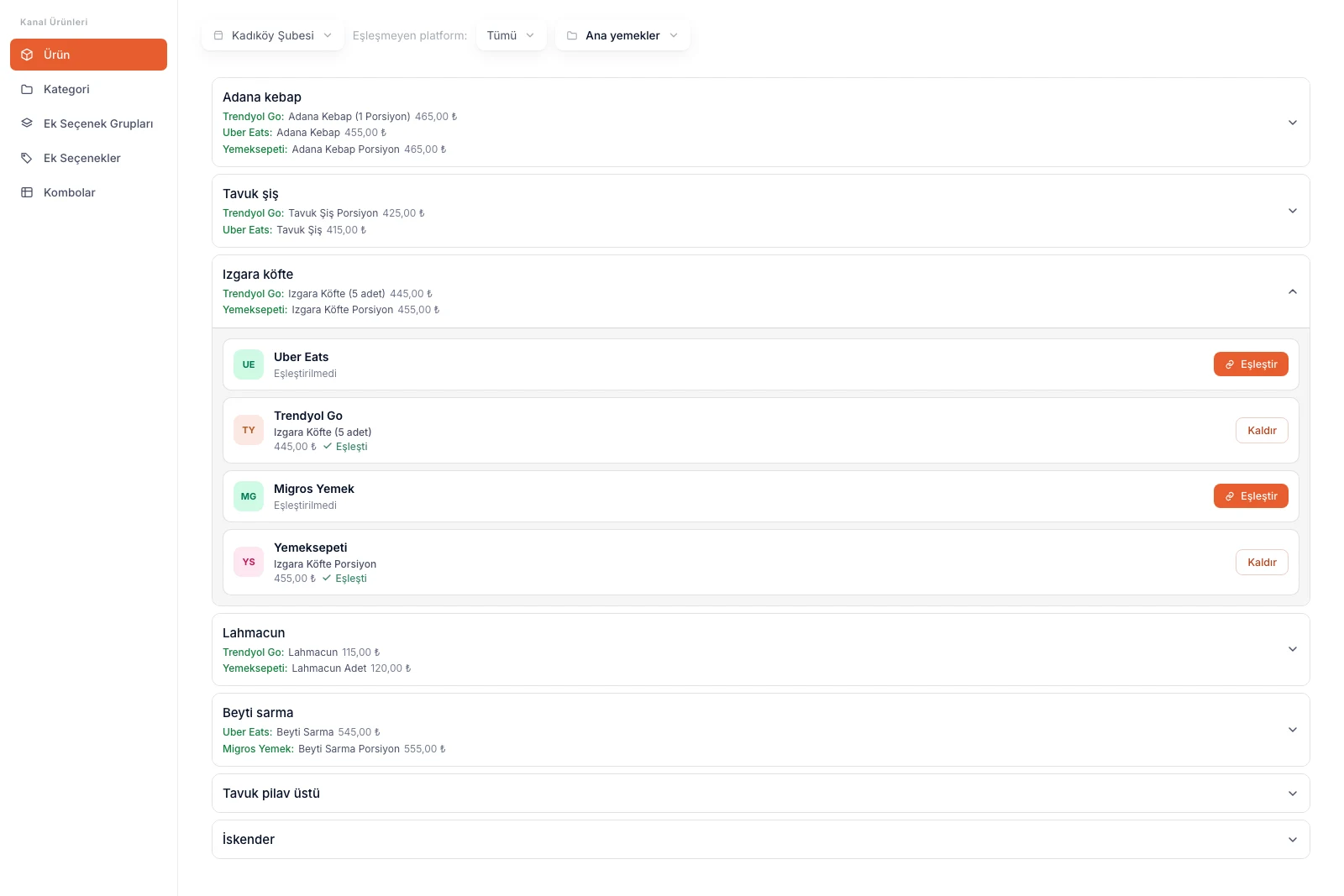
Channel products, branch selected

The branch comes first

The first control on the screen is the branch. Matching belongs to that branch's store on the platform; switch branches and both the list and the counterparts change.

Platform counterparts under the product

Your catalog product is the heading; under it, line by line, is the name and price it carries on each platform. The names do not have to agree. The link does.

Filter down to what is unmatched

The unmatched-platform filter leaves only the rows with no link. When you open a new branch, that filter is what tells you where the gap is.

Products, categories, options, combos

The side rail splits matching into its four surfaces: products, categories, option groups and options, combos. All four are per branch.

Channel products screen: branch picker on top, products with their platform counterparts and matching cards

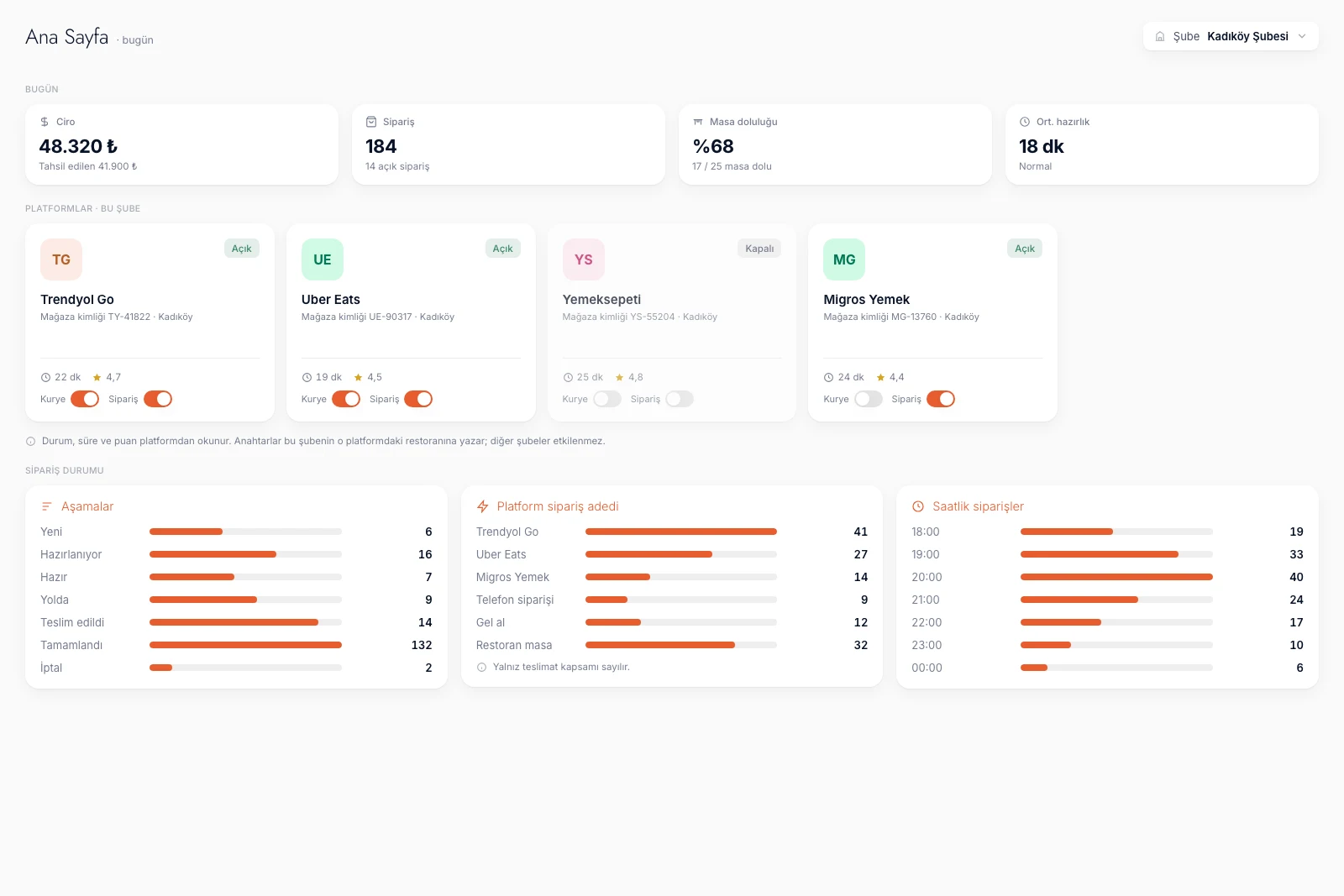
Home, that branch's platforms

The branch's open platforms become cards

The cards are built from the channels open at that branch. A closed channel does no work here; it is opened on the Branches and Channels screen first.

The Orders switch closes the store

Turn it off and that branch's store on that platform stops taking orders. You do not touch the menu, the catalog stays put, and the other branches keep going.

Courier availability is its own switch

With no driver, you turn off courier availability without closing the store. The dining room and dine-in orders are untouched.

Time and rating are read from the platform

At the foot of the card sit the average prep time and rating the platform keeps. These are the platform's own numbers, not a dojofood calculation.

Home platform cards: open and closed chips, prep minutes, rating, courier and orders switches

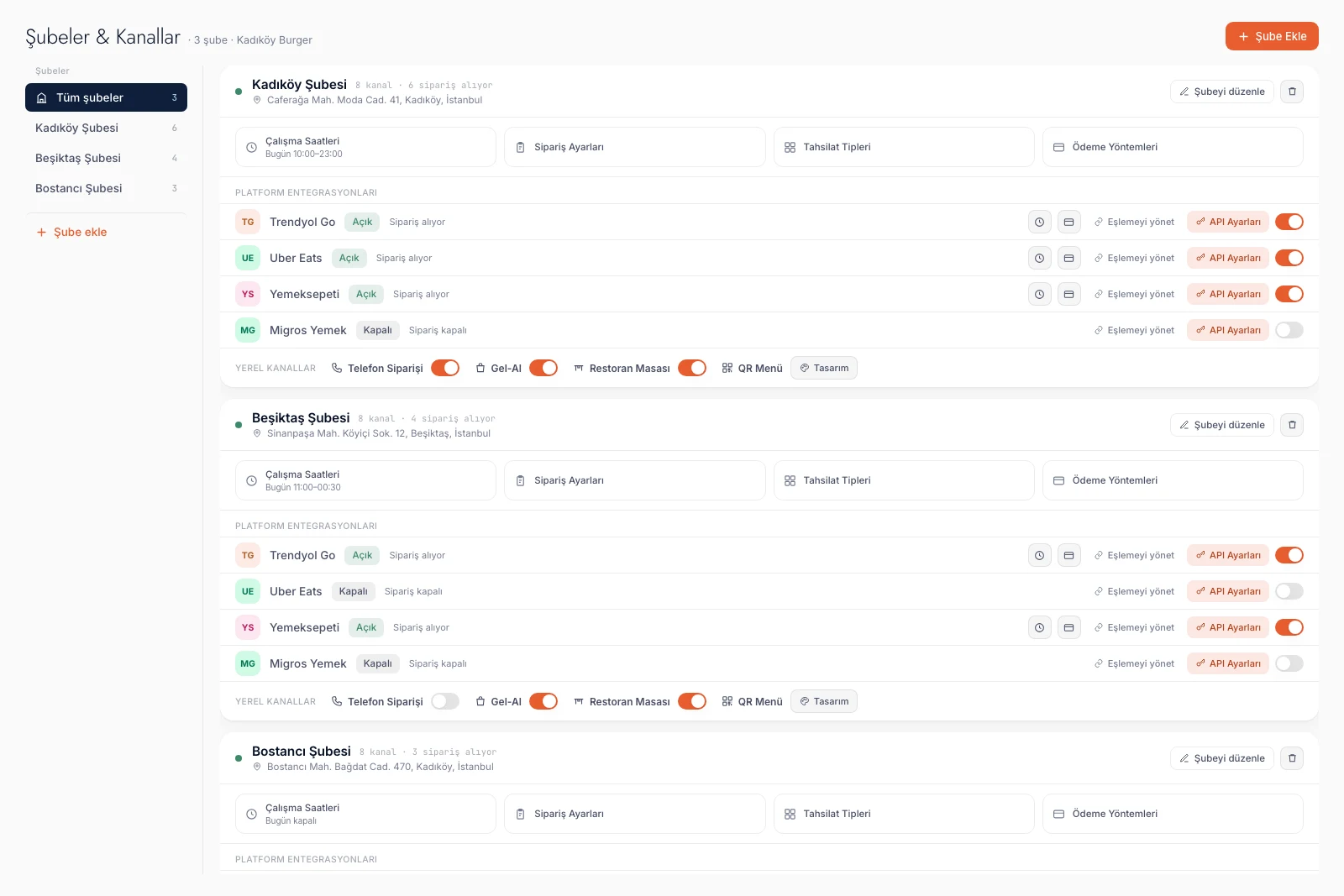
Branches and channels

Switch, credentials and matching on one row

A platform's row carries four things at once: open or closed, API settings, manage matching, and the switch itself. Opening a channel and entering its credentials finishes on that row.

An open channel grows two more buttons

The moment a channel opens, the row gains platform opening hours and platform payment methods. On a closed channel neither appears, because there is no cell to write to yet.

Local channels sit on the same card

Phone order, take-away and dine-in carry their own switches on the strip at the foot of the card. The QR menu is there too, and its design opens on its own page.

The branch's four settings on top

Opening hours, order settings, checkout types and payment methods sit directly above the platform rows. The channel call is made on the same screen.

Branches and channels screen: each branch in its own section with platform rows and switches

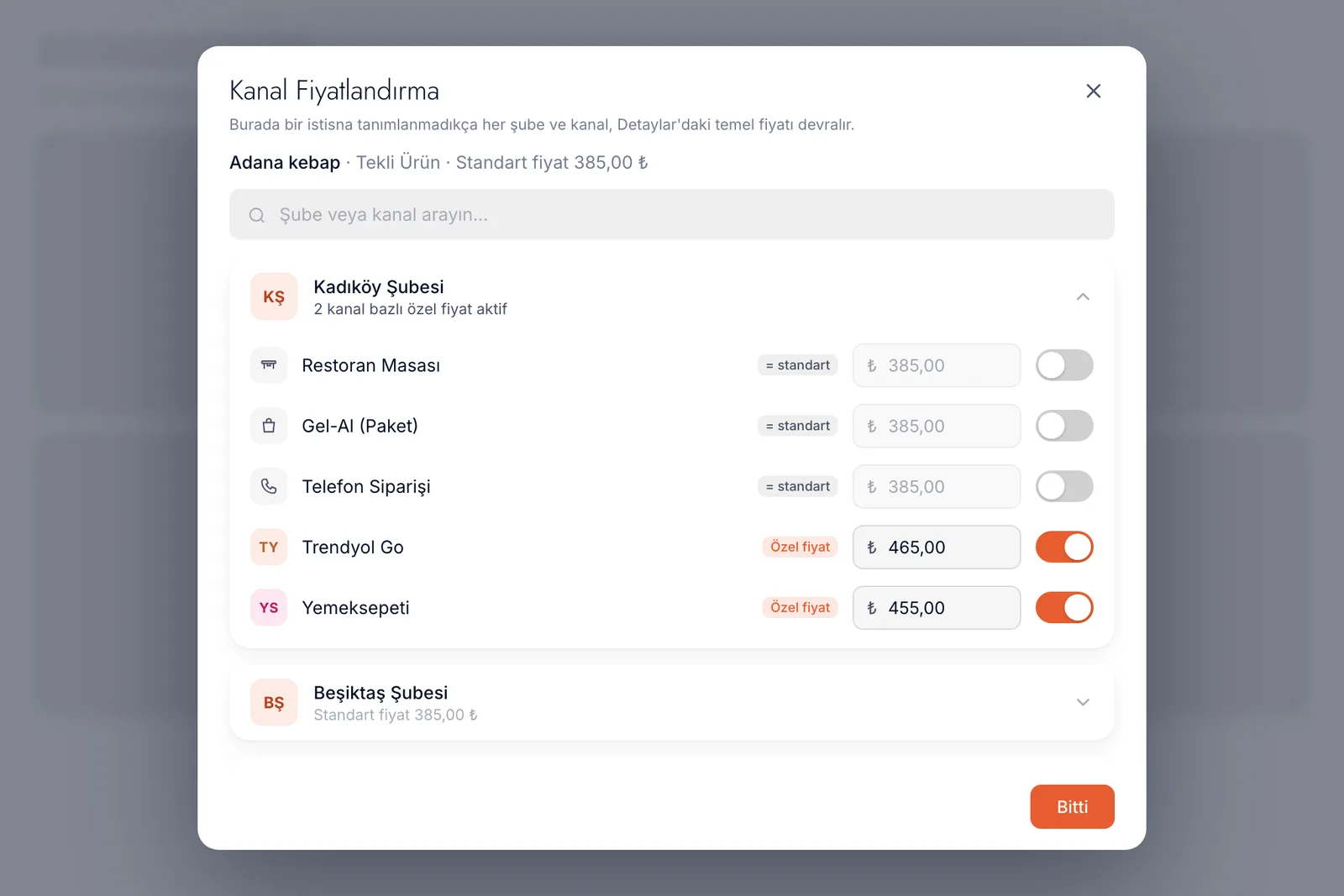
Branch × channel price

Search finds branches and channels alike

The search box at the top of the dialog matches branch names as well as channel names. In a ten-branch chain you land on the row you want without scrolling.

Override counter in the branch header

A branch header says how many channel overrides that product carries. The counter only counts prices that genuinely differ; a row repeating the standard is not an override.

The base is the branch standard, not the catalog

A channel price is written over that branch's standard price rather than the catalog price. Change the branch price and every channel without an override moves with it.

Channel pricing dialog: branches as collapsible sections with an override switch on each channel row
Branch × channel

The channel call is made in a cell.

In a chain, a channel gets discussed like a brand decision and then lives as a cell. Where one branch meets one platform there is a separate identity, a separate clock, a separate matching and a separate price. Press a cell in the diagram below and you see what that intersection carries.

BRANCH × CHANNEL

The channel call is made on the branch card

BRANCH × CHANNEL
LocalKadıköy branchModa6 of 8 channels taking ordersPhone order openTake-away openDine-in openBeşiktaş branchSinanpaşa4 of 8 channels taking ordersPhone order closedTake-away openDine-in openBostancı branchBağdat Avenue3 of 8 channels taking ordersPhone order closedTake-away openDine-in open
AT THIS INTERSECTION

Kadıköy branch · Uber Eats

  • Credentialsthis branch's own API key and platform store id
  • Platform hours10:00 – 22:30, separate from the dining room
  • Payment mapthe platform's tender types are mapped here
  • Product mapping148 products matched to the catalog
  • Channel price6 products differ from the branch standard
credentials and mapping are stored on this intersection alone
HOME · THAT BRANCH

How an open channel stands right now.

One card for every platform the branch has open:

  • Ordersopens and closes the store on that platform
  • Couriercourier availability switch
  • Timeaverage prep minutes
  • Ratingthe score the platform gives
read from the platform, written to the platform

One catalog underneath. The mix on top is each branch's own call; closing one intersection touches no other.

Kadıköy branch · Uber Eats · open.

Rows are branches, columns are channels. Press a cell and you see what that branch carries on that channel. Credentials, platform hours, payment map, product mapping and price belong to the intersection, not to the branch.
From the floor

What happens on the channel side when the second branch opens.

The second storefront on the platform

Yaygın sorun

You opened the second branch. The platform does not see one brand; it sees a separate store with its own id, its own panel, its own key. A system that holds one account per platform simply cannot connect the second branch.

dojofood'da

Credentials are held per branch and per platform. One branch's key belongs to that branch and the next branch's to the next, and both run off the same catalog.

Typing the new branch's menu again

Yaygın sorun

Every new branch means rewriting the same hundred and forty products, rebuilding the same option groups, redefining the same combos. It takes a day and somewhere in it a typo survives.

dojofood'da

The catalog, products, option groups, combos and recipes are held at the business level. A new branch inherits all of it; the only work left is that branch's platform matching.

A platform that does not work in one area

Yaygın sorun

One platform will not put a driver in your second branch's area, or there is simply no demand there. Turning the channel off across the whole chain is not an option either; at the flagship it is the best-selling channel you have.

dojofood'da

The channel call is made on the branch's card. You turn the switch off at that branch and the others keep running the same platform. Nothing in the catalog changes.

A Friday night the kitchen cannot hold

Yaygın sorun

It is eight o'clock and one branch's kitchen is buried. Orders keep landing, times stretch, the rating slides. You cannot see a way out short of deleting the menu.

dojofood'da

You turn off the Orders switch on that branch's platform card on Home. The store stops taking orders on that platform and at that branch alone, and you switch it back on when the rush passes.

An hour with no driver

Yaygın sorun

Your driver is off and the platform has none free either. Close the store outright and you lose the take-away orders too.

dojofood'da

Courier availability is a separate switch. You turn that off and the store stays open on the platform; the dining room and dine-in orders are untouched either way.

A platform clock that differs from the room

Yaygın sorun

The dining room runs until midnight but for the last half hour the kitchen wants to serve tables only. Going into each platform's own panel to change hours is a separate errand for every branch.

dojofood'da

Every branch defines opening hours day by day for every platform it runs. The room's clock and the platform's clock do not have to agree, and both are managed from one screen.

Two areas, two prices

Yaygın sorun

The same burger cannot carry the same price at both branches; the rent is different, the area is different, what the platform takes is different. Defining the product twice splits the catalog in half.

dojofood'da

The product is one and the price runs on three levels: the catalog price, the branch standard, and where needed that branch's amount on that channel. A channel price is written as a number.

Nobody knows which branch is open where

Yaygın sorun

Three branches and five platforms is fifteen possibilities. Nobody quite knows who is open where, and one branch has spent weeks waiting for orders on a channel that was closed.

dojofood'da

The branch rail carries a number beside every branch: how many of the eight channels are taking orders. You read the state of the estate without opening a list.

Two switches

Setting a channel up and keeping it open right now are different jobs.

This is the thing that gets muddled most in a chain. Whether a channel is connected and whether it is taking orders at this moment are two separate decisions, and dojofood puts them on two separate screens.

The first switch is on the Branches and Channels screen and describes the setup: is this branch connected to this platform. The moment you open it the cell exists, and you enter the credentials, set the platform's opening hours, map the payment methods and attach the products. Close it and the cell stops; the settings are not deleted.

The second switch is on Home and describes the moment: is this branch taking orders on this platform right now. The card reads the state back from the platform itself; the Orders switch closes that branch's store there, and the Courier switch cuts only the delivery side. Beside them sit the average prep time and rating the platform keeps.

Businesses standing side by side in a busy food court
One brand, different areas, different channel mixes. The channel call gets discussed at the centre and made on the branch's card.

Keeping the two apart has a practical payoff: when the rush passes, all you do is switch one thing back on. You do not re-enter credentials, you do not rebuild the matching, you do not resend a menu. The setup stays where it is and only the open-or-closed state moves.

What the cell holds

The same platform, two branches, two separate records.

Everything complicated about the channel side of a chain comes down to one sentence: the platform knows you store by store, not as a single brand. dojofood holds it the same way.

A branch's record on a platform carries four things. Credentials: API key, secret key, supplier id and the store id the platform issued you. They belong to that branch and are not copied to another. Order ingestion: how the order arrives. Three platforms carry this setting, its default is polling, and without it ingestion never starts at that branch, which is why the setting lives on the channel's own row.

Platform opening hours: day by day, for that branch and that platform. Payment method mapping: the platform's tender types are mapped to that branch's payment methods, so at the end of the day it is clear which money came from where. That last one has a real limit: Trendyol Go does not support the mapping. dojofood does not hide it; it tells you when you press the button.

A delivery order handed from the counter to a courier
Once a channel is connected, an order lands on that branch's unified order board and kitchen screen whichever platform it came from.

The fifth thing is product matching and it lives on its own screen. The platform's list is pulled from that branch's store and set beside your catalog product. The names need not be identical; once the link exists the order lands as your product regardless of what the platform calls it. The unmatched-platform filter shows at a glance where a new branch still has gaps.

The full mechanics of channel pricing are covered in catalog and menu management; what matters here is that the base is the branch standard rather than the catalog, and that a channel price is written as an absolute amount.

Limits

What this page does not claim.

On the delivery side, what dojofood cannot do is as clear as what it can. Setting up a chain, you need both.

Runs per branch

The channel switch · credentials · platform opening hours · payment method mapping · product, category, option and combo matching · the branch standard and the branch × channel price · order automation settings · opening and closing the store on a platform · courier availability.

Written once

Catalog · products · option groups · combos · recipes · stock items · menus and their schedules · roles · company details. A new branch inherits all of it and you do not edit these from the branch.

Not there today

Pushing a menu from the catalog to a platform · switching a single platform item on or off from dojofood · a channel closing itself when stock runs out · a channel breakdown in end-of-day reports · a platform commission line and a profit-and-loss table · a percentage rule on channel prices.

Some of that is the platforms' own limit: menu push and closing a single item remotely are not writable, so dojofood does not promise them. What you can close is the store itself, and that genuinely works. A channel does not close itself when stock runs out; dojofood warns you and the call stays yours.

The channel-split end-of-day report and the commission line are missing on our side. Home carries one platform tile with an order count and it counts delivery only; do not read it as a profit-and-loss table. Which branch earns what is covered by restaurant analytics, and the total at the centre by multi-branch management.

A quiet dining room and tables being set at opening
A channel mix is not a fixed decision. As branches open, areas change and kitchen capacity moves, the matrix moves with them.
One system

The channel mix sits in the same system as the rest of the chain.

Deciding channels per branch is not a feature on its own; it stands on the catalog, the order board and the branch model.

01

Multi-branch management

The line between the business and the branch, all-branches mode, menu assignment and the chain total at the centre. See multi-branch management →
03

Catalog and menu management

The product card, option groups, combos, recipes and the full mechanics of channel pricing. See catalog management →

Frequently asked questions

What operators ask about delivery channels across branches.

Can each branch run different delivery platforms?

Yes. Which of the eight channels takes orders is written on each branch's own card. One branch can run a single platform while another runs three; both work off the same catalog.

Does every branch get its own account on the same platform?

Yes. Credentials are held per branch and per platform: API key, secret key, supplier id and the store id the platform gave you. On the platform's side a chain is a separate storefront at every branch.

If I close a channel at one branch, does it affect the others?

No. The switch writes to that branch's record on that platform. Other branches keep running the same platform and the catalog does not move.

Can the same product carry a different price per branch and per channel?

Yes. Price runs on three levels: the catalog price, the branch standard, then the branch-and-channel intersection. A channel price is an absolute amount, not a percentage added to a base.

Can a platform keep different hours from the dining room?

Yes. Every branch defines opening hours day by day for every platform it runs. The dining room can stay open half an hour longer while the platform closes first.

Can I map the platform's payment methods per branch?

Mostly yes. A platform's tender types are mapped to that branch's payment methods. Trendyol Go does not support this mapping and dojofood says so on screen rather than failing quietly.

If the kitchen is buried, can I close one platform at one branch?

Yes. Home shows a card for every platform the branch has open; the Orders switch stops the store on that platform alone. The dining room and the other platforms keep going.

Do I have to map products separately for every branch?

Yes. The platform's product list is pulled from that branch's store and matched to your catalog. A product is written once; the matching is done per branch and per platform.

Which marketplaces do you integrate with?

Uber Eats, Wolt, Bolt Food, Deliveroo and Just Eat in the global edition, and the Turkish set on the Türkiye site. If the platform you use is missing, say so when you book the demo; when a real operator needs it we put it in the plan.

Can I push my menu from dojofood to the platform?

No. Matching runs the other way: the platform's list comes into dojofood and you attach it to a catalog product. You cannot switch a single platform item on or off from dojofood; what you can close is the store itself.

Do end-of-day reports break down by channel?

No. Reports are per branch and carry no channel breakdown. Home has one platform tile that does show a split, and it counts delivery only. The full report family is on restaurant analytics.

Can incoming orders be confirmed automatically?

Yes, per branch. With auto confirm on, an incoming order moves to preparing without waiting for an operator. A busy branch switches it on; a quiet one confirms by hand.

When I open a new branch, do I set the channels up from scratch?

Partly. The catalog, products, combos and recipes are inherited ready-made. What belongs to the branch alone is its channel mix and each channel's credentials and matching.

How long does setup take?

Around 10 minutes to be usable, and every business gets a customer manager who walks you through the branch and channel setup. Platform account approvals run on the platforms' own timelines.

Have questions? Let's talk.

Tell us your needs and your challenges. We'll show you how dojofood eases your operation.

Walk us through your current stack, your marketplace list, your volume. We'll show you exactly how dojofood fits, what it replaces, how to get started, and what it costs.